Features
Develop it once. Publish it in every format.
One developed outline becomes many finished formats — no rebuilding from scratch for each one.
Plus Docs & PDF are part of 32 export formats, and any output can ship in 21 languages.
An Idea Incubator is where raw thoughts grow into finished work.
Most tools store your notes. An Idea Incubator does something different — it takes the scattered raw material of your thinking (half-formed thoughts, saved videos, PDFs, web pages, meeting scraps) and actively grows them into structured, usable ideas.
Capture
Drop in anything, no matter how rough. A 2am thought, a YouTube video, a dense PDF, a voice memo.
Structure
Watch chaos become an outline you can shape, expand, and rearrange.
Enrich
Live Books brings any part up to date against the live web whenever you ask, on your own Google AI key, so your thinking never goes stale — then query your evolving knowledge base and get answers from everything you've captured.
Hatch
When an idea is ready, generate the finished thing: a document, a script, a podcast, a content package.
That's the difference between a filing cabinet and an incubator. One stores your ideas. The other helps them grow up.
Written work and multimedia, from one outline.
IdeaM is the idea developer for both written content and multimedia. Snap a whiteboard photo and watch it become a structured outline. Pick a branch and IdeaM produces a complete YouTube content package — script, chapters, description, SEO, B-roll prompts. Multimedia in, multimedia out.
Your Second Brain,
Amplified
IdeaM is a true intelligence amplifier—it doesn't just store information, it enhances your cognitive capabilities. Build a knowledge repository that grows with you, surfaces hidden connections, and accelerates your thinking.
Expanded Knowledge Scope
Your brain can only hold so much. IdeaM becomes your external memory—capturing every source, every insight, every connection you've ever encountered. Access decades of accumulated knowledge instantly.
Accelerated Access
Find what you need in seconds, not hours. Hierarchical outlines, AI-powered search, and smart organization means your knowledge is always at your fingertips—ready when you need it.
Hidden Connections
See what others miss. The hierarchical structure reveals complex interrelationships between ideas, surfaces creative possibilities, and helps you synthesize insights that would otherwise remain hidden.
“The difference between experts and novices isn't just what they know—it's how quickly they can access and connect that knowledge. IdeaM gives everyone an expert's cognitive edge.”
Professional Research Workflows
From meeting room
to published paper
Every step of the professional research workflow, powered by AI.
Literature Review in Hours, Not Months
Import research papers, conference recordings, technical reports, and field notes simultaneously. AI consolidates everything into one outline organized by subject, not by source: ideas matched across sources, disagreements shown side by side, and every statement traced to the source it came from.
Capture Physical Meetings & Interviews
Record in-person meetings, focus groups, or field interviews. Upload the audio and get automatic transcription with speaker diarization—know exactly who said what.
Turn Any Outline Into a Podcast
Select any branch and generate a professional podcast. Choose voices, style, and length.
Auto-Generate Mind Maps & Flowcharts
Select any branch and instantly turn its structure into a mind map, flowchart, or org chart—export it or embed it right in your outline.
Ask Your Knowledge Base
Ask questions about one outline or across everything you’ve captured—answers come from your own sources, not a generic web guess.
From Outline to Video Package
ShippedPick any branch and generate a complete YouTube package—voiceover script, chapter markers, title variants, SEO tags, thumbnail concept, and B-roll prompts.
Answer a few questions.
Get the finished work.
Press the hammer, pick a workflow, answer a few questions — and IdeaM builds a complete, structured result right in your outline, in one go.
Every Workflow Is an Outline
A workflow is simply an outline — the tool you already know. Open one and every step is right there to read. Change a question, add a section, copy it, share it with a colleague, or write your own from scratch.
Ready to run today
- Start a Business
- Restaurant
- Consultancy
- SEO Optimization
- Review Writer
- Client Engagement
- Podcast
- YouTube Video
- Website
- Automatic Book
- Novel — novella or full-length
- Screenplay — short or feature film
- TV Pilot — one-hour, half-hour or multi-camera
A Professional's Structure
Each workflow lays down the sections a seasoned practitioner would insist on — the money, the menu, the stakeholder map — so the shape of the work is right from the first minute.
Finished, Ready to Hand Over
Several workflows finish by producing the document itself — a business plan as a PDF, a literature review in Word, a client engagement as a slide deck.
Workflows Inside Workflows
Start a Business asks what kind of business you're opening, then runs the Restaurant or Consultancy plan right where it belongs. Link your own workflows together the same way.
What IdeaM can write for you
Fiction and nonfiction, scripts and posts. Start with an idea and IdeaM writes a strong first draft right in your outline, ready for you to shape, sharpen and make your own.
Fiction & storytelling
From a one-line idea to a novel, a screenplay or a TV pilot you can shape chapter by chapter and scene by scene.
- NovellaA complete short novel, written chapter by chapter as prose.
- Full-length novelThree parts, every chapter written, in the point of view and tense you choose.
- Chapter-by-chapter outlineEvery chapter and the beats of every scene, before a word of prose.
- Short-film screenplayA complete short, act by act, in proper screenplay format.
- Feature-film screenplayA full-length film, written act by act and scene by scene.
- TV pilotA one-hour drama, half-hour comedy or multi-camera sitcom pilot, act by act, in TV script format.
- Series bibleThe logline, characters and their season arcs, the world, season one and future episodes.
- Title and loglineThe one-sentence pitch that makes people want the story.
- Character profilesYour cast, sketched and ready to come alive on the page.
- The story worldWhere and when it all happens, and how that world works.
- Scene-by-scene outlineThe whole story laid out, so you can see it before you polish it.
- Book PDF and ePubYour novel as a book with a contents page, and as an e-book.
- Screenplay filesAn industry-format PDF, or Fountain to open in Final Draft.
Nonfiction & professional
Books, plans and everyday writing, built from what you already know.
- A full bookChapter by chapter, in the voice and reading level you choose.
- Business planThe business on one page, the money, and getting legal.
- Restaurant opening planConcept, menu, kitchen, staffing and opening day.
- Consultancy planPositioning, pricing, pipeline and how you deliver.
- Literature review (Review Writer)A first draft built from real papers it retrieves, with every citation checked, a PDF and BibTeX / RIS references.
- Client engagement planCharter, stakeholders and workplan, finished as a slide deck.
- SEO planA keyword map, on-page fixes and a content plan.
- EmailsWritten from a branch of your outline, in the tone you pick.
- SummariesAny outline, boiled down to what matters most.
- Section draftsContent written for an item, or for every item beneath it.
- RewritesA whole outline reshaped: shorter, deeper, or in a new style.
- TranslationsAny section, carried into another language.
Scripts & content
Words written to be heard, watched and shared.
- PodcastA two-host conversation, voiced and ready to play.
- Narrated videoA narrated, branded video written from your outline.
- YouTube packageVoiceover script, titles, description, chapters and tags.
- Animated-video scene sheetImage prompt, animation prompt and dialogue, scene by scene.
- Social postsFor X, LinkedIn, Instagram, Facebook, Threads, Bluesky and YouTube.
Every draft lands in your outline, where you can move, rewrite and grow it like anything else you write.
IdeaM — Screenplay Writer IdeaM — Novel Writer IdeaM — TV Pilot Writer
Real output, side by side
Short visual notes that show what IdeaM writes, using its own prompts on a real project.
Screenplay Writer: one scene, three ways
The same scene written on your Mac for free, in Hybrid with a Google polish, and in Faster mode, with who wrote what, how long it took and what it typically costs.
Open the visual noteReview Writer: a literature review grounded in real papers
Ask a research question and get a fully cited first draft in your outline, built from the open scholarly record.
Open the visual noteCatch the thought
before it's gone
One tap from your Home Screen, even with no signal, straight into your Inbox.
From Idea to Inbox in Seconds
Press and hold the IdeaM icon on your Home Screen and choose New Capture. IdeaM opens straight to a capture box with the keyboard up — type it, or tap the keyboard's microphone and just say it. Tap Save to Inbox and get on with your day.
No Signal? Keep Going
On a plane, in a basement, deep in the woods — capture anyway. Everything you save offline goes into your Inbox the next time IdeaM opens.
Saved on Your Device First
The moment you tap save, your capture is kept on your phone — and it stays in that holding tray until your Second Brain has safely stored it.
Filed Once, Ready to Grow
Each capture lands in your Second Brain Inbox exactly once, waiting for you to sort it, link it and build on it. On a Mac, the same Inbox is one keystroke away: ⌘⇧I.
Turn an outline into
a plan you can run
Task items, statuses, priorities, due dates and prerequisites — turning an outline into a plan you can actually run. Off until you switch it on in Settings.
Five Instant Reports, With No AI Involved
Run the five instant reports from the AI menu. They're pure logic: no AI, no cost, and they never modify a task — they simply read the structure you already have.
Task Items, Right in the Outline
Any item becomes a task with a checkbox and a details form — and four statuses that say where it really stands.
Priorities, Due Dates, Prerequisites
Say what matters most, when it's due, and what has to happen first — with clear warnings when a task is blocked by something upstream.
Board View
Right-click a section to see it as a board — sub-sections become columns, items become draggable cards, and dragging a card genuinely restructures the outline. Undoable, free, no AI.
Email in, email out
— and nothing sent without you
Off by default — IdeaM never sends for you and never touches your inbox.
Your Inbox Stays Your Inbox
Email tools do nothing until you turn them on in Settings. IdeaM never sends email for you and never touches your inbox — you always review the draft and hit send yourself.
Import Email
Drop in an email or a whole thread — paste the text or drop in a .eml file — and instead of a wall of quoted text you get a clean outline of the key points, decisions, and to-dos.
Junk Filed, Never Deleted
Suspected junk is filed into a clearly-labelled branch — never deleted, always rescuable — so nothing is thrown away on your behalf if it got one wrong.
An Email, Written From a Branch
Sketch your thoughts as an outline, pick the tone — friendly professional, formal, or casual — then hand the finished draft to Gmail, your mail app, the clipboard, or a .eml file.
Real screenshots, real product.
No mockups. This is IdeaM today — from the writing workspace to the finished outputs it produces.
Made for light lovers and dark lovers alike — the same workspace, your way.
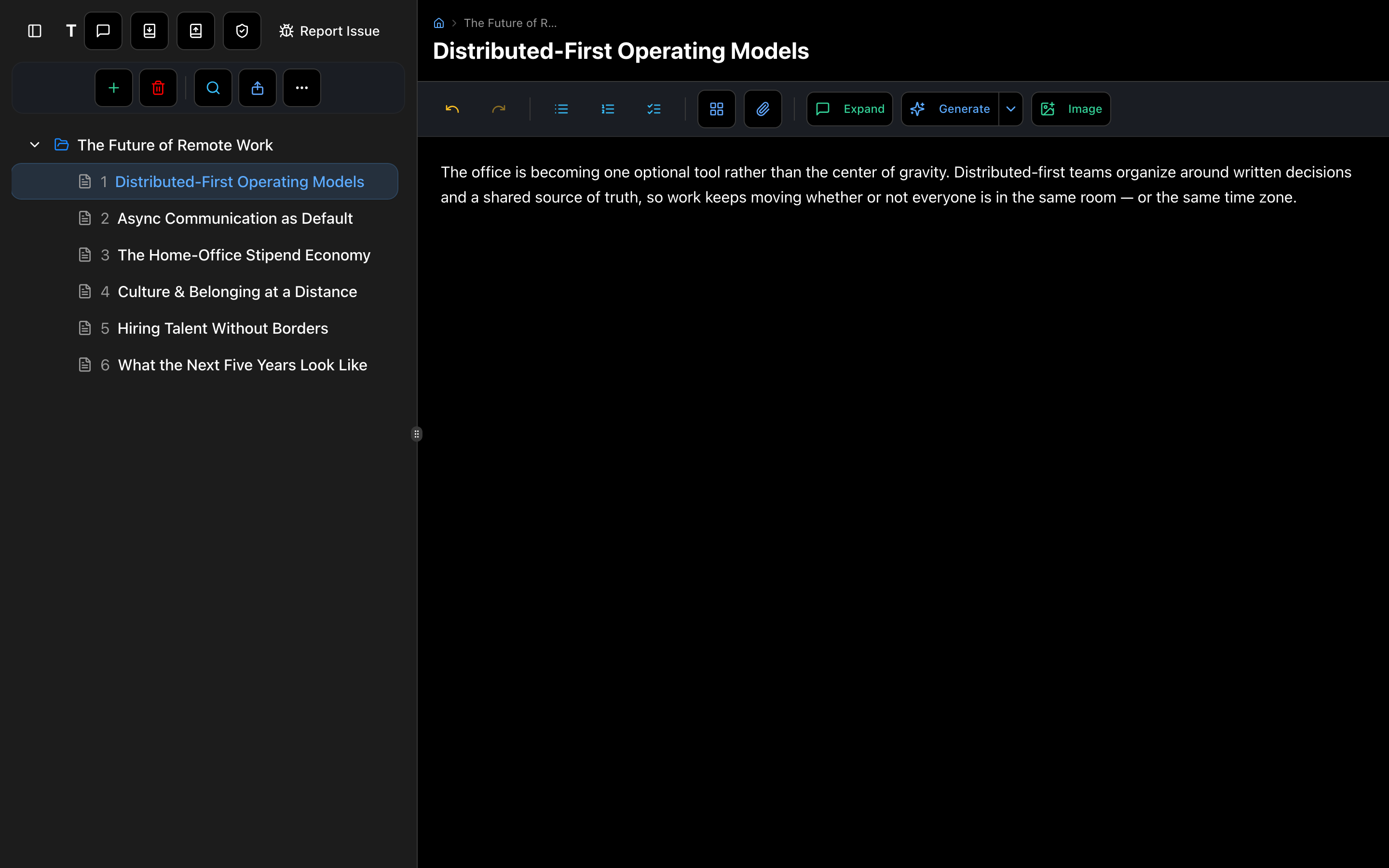
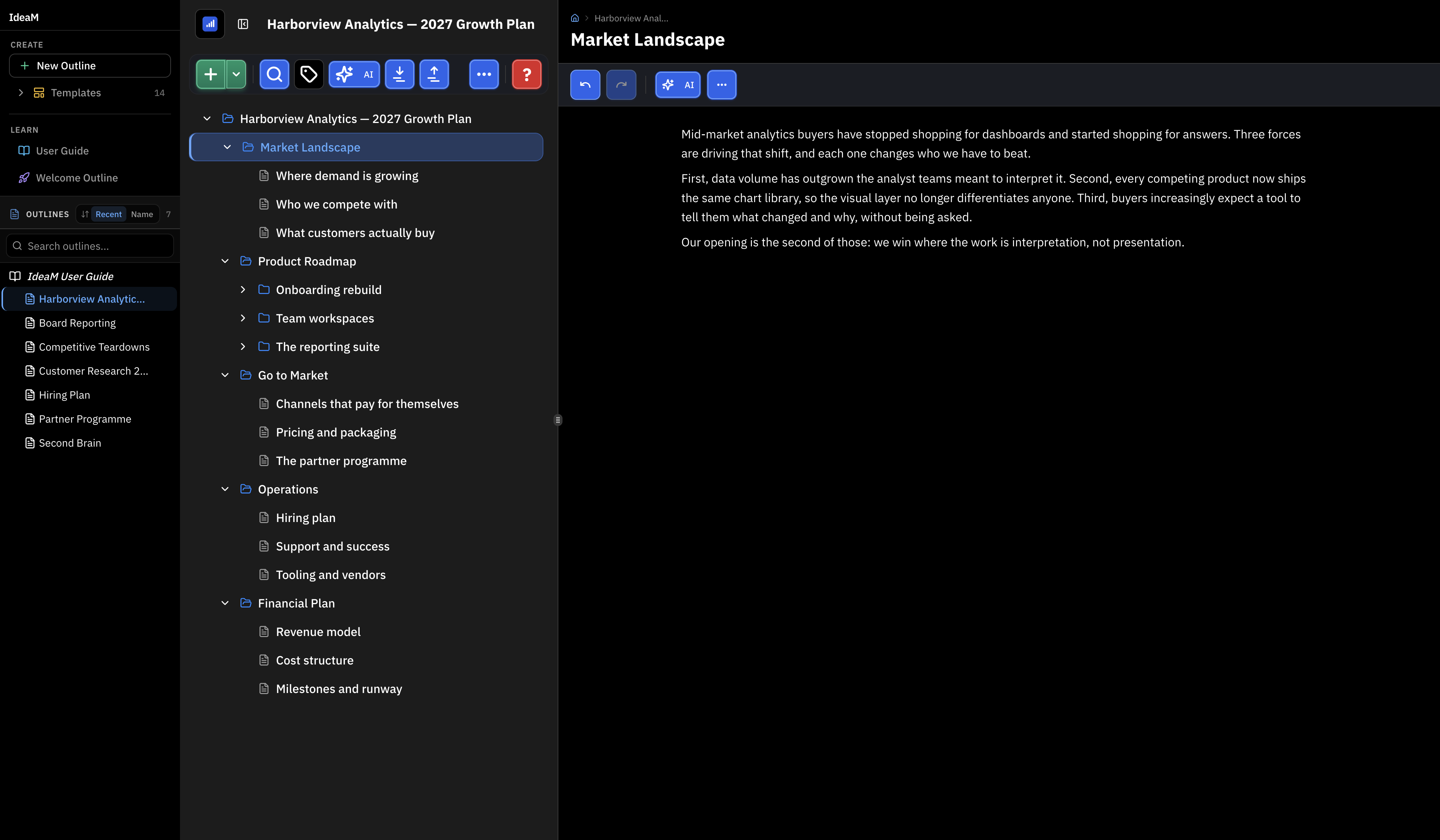
The two-pane workspace
Your outline structure on the left, a rich content editor on the right.
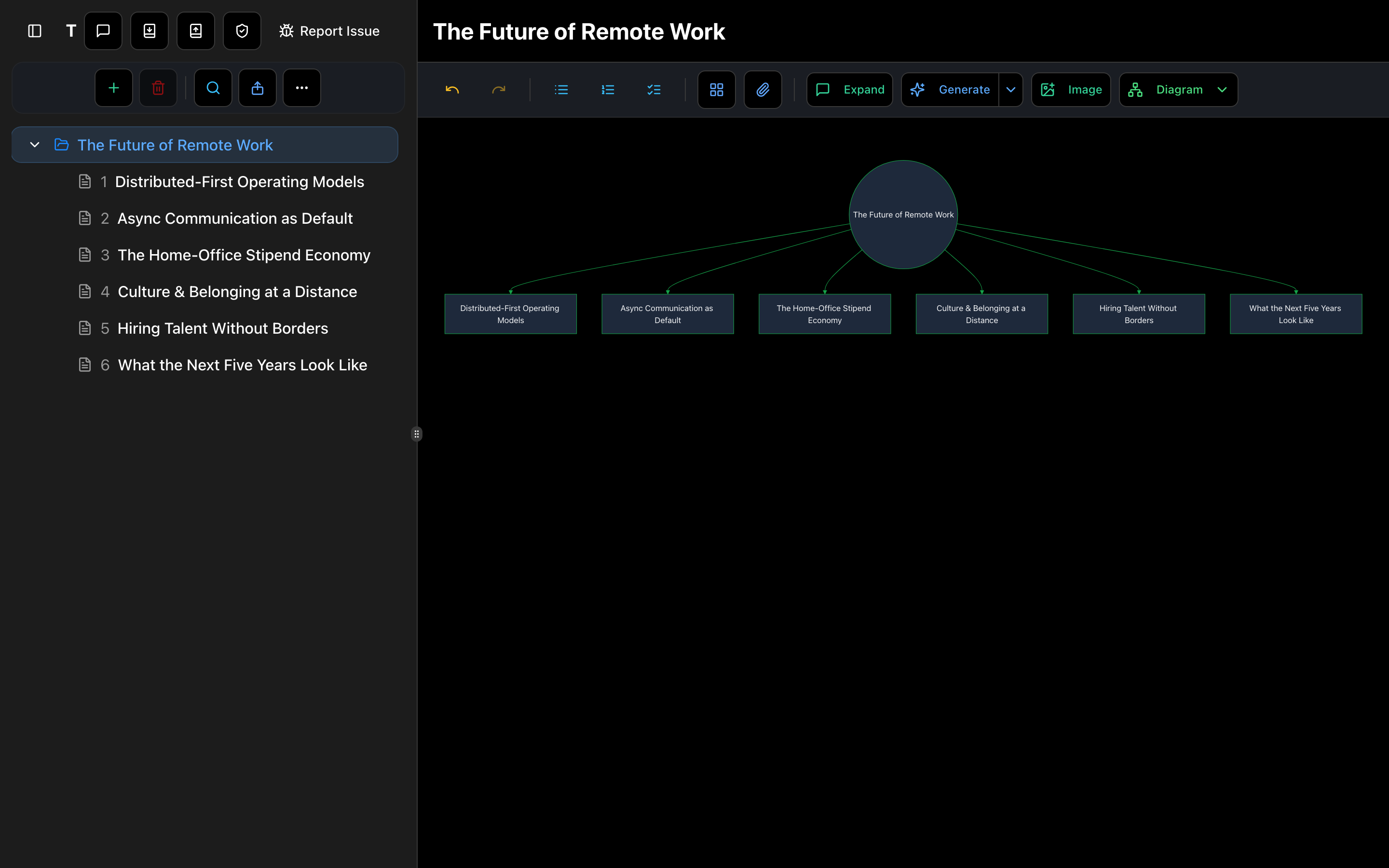
Auto-generated mind maps
Turn any branch into a mind map, flowchart, or org chart in one click.
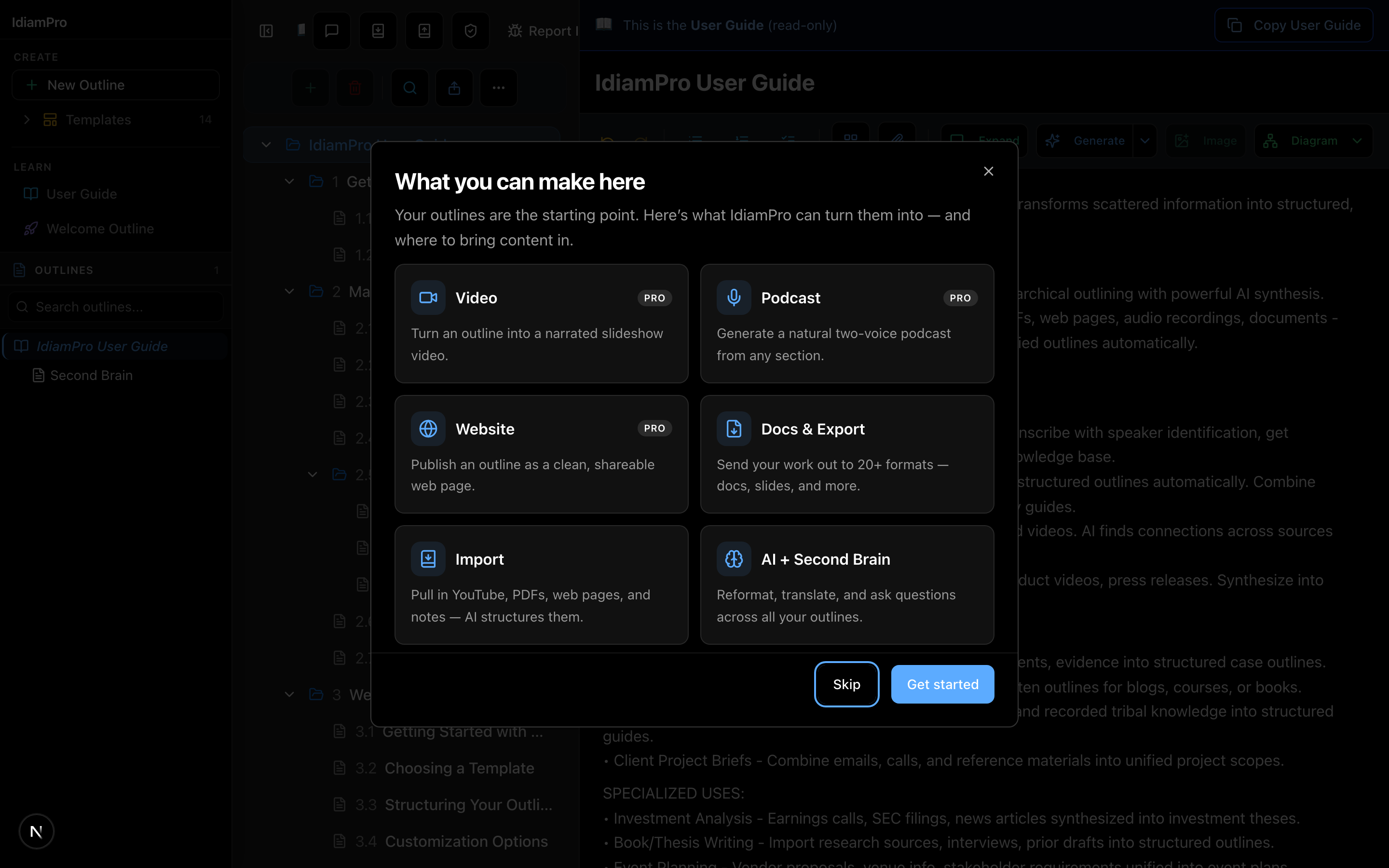
One outline, many outputs
Video, podcast, website, docs and more — all from the same outline.
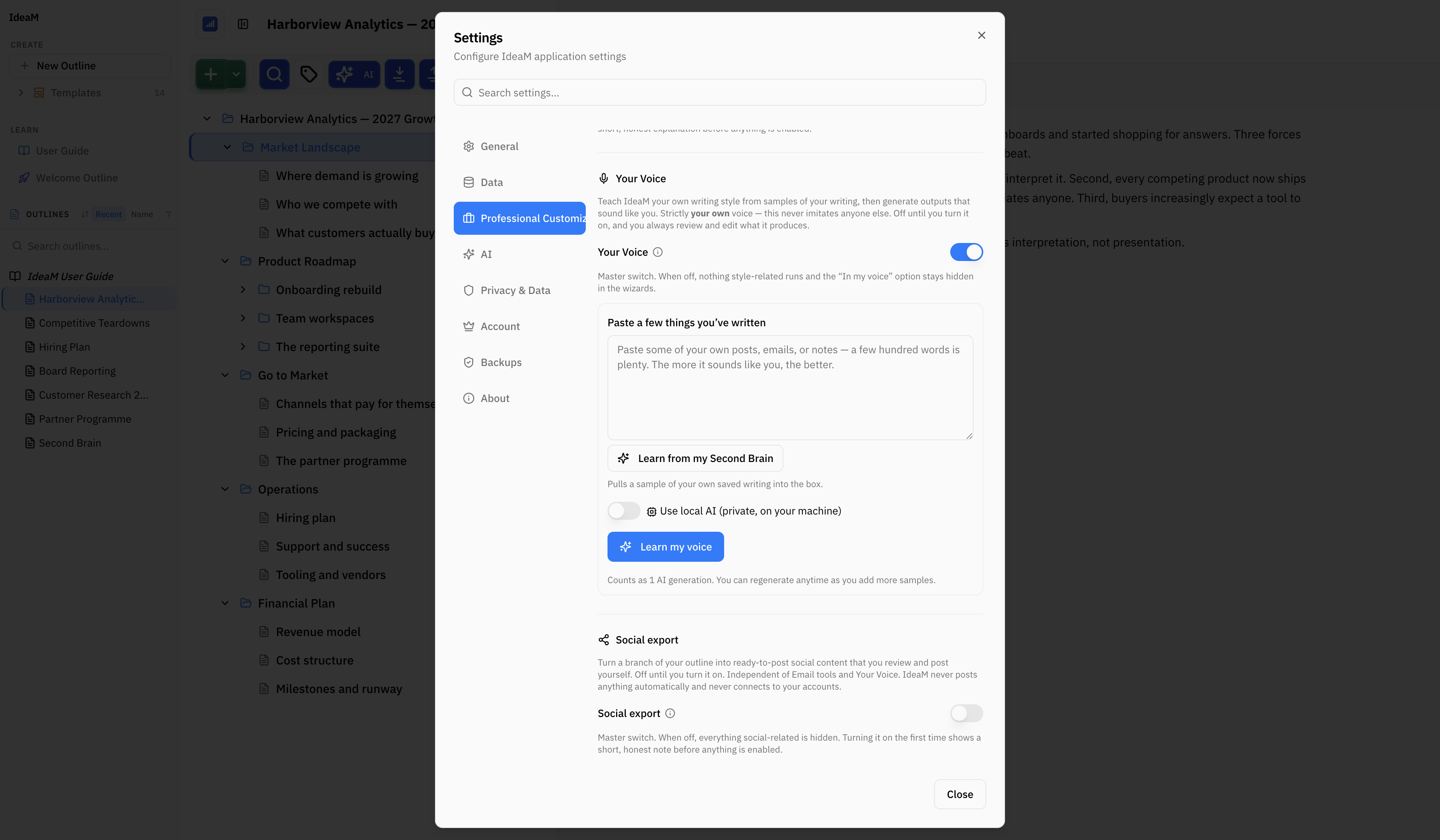
Writing that sounds like you
Paste a few things you've written — or let IdeaM learn from what is already in your Second Brain — and it builds a writing profile you can read and edit. After that, anything it drafts can come out in your voice rather than a machine's. Off until you switch it on.
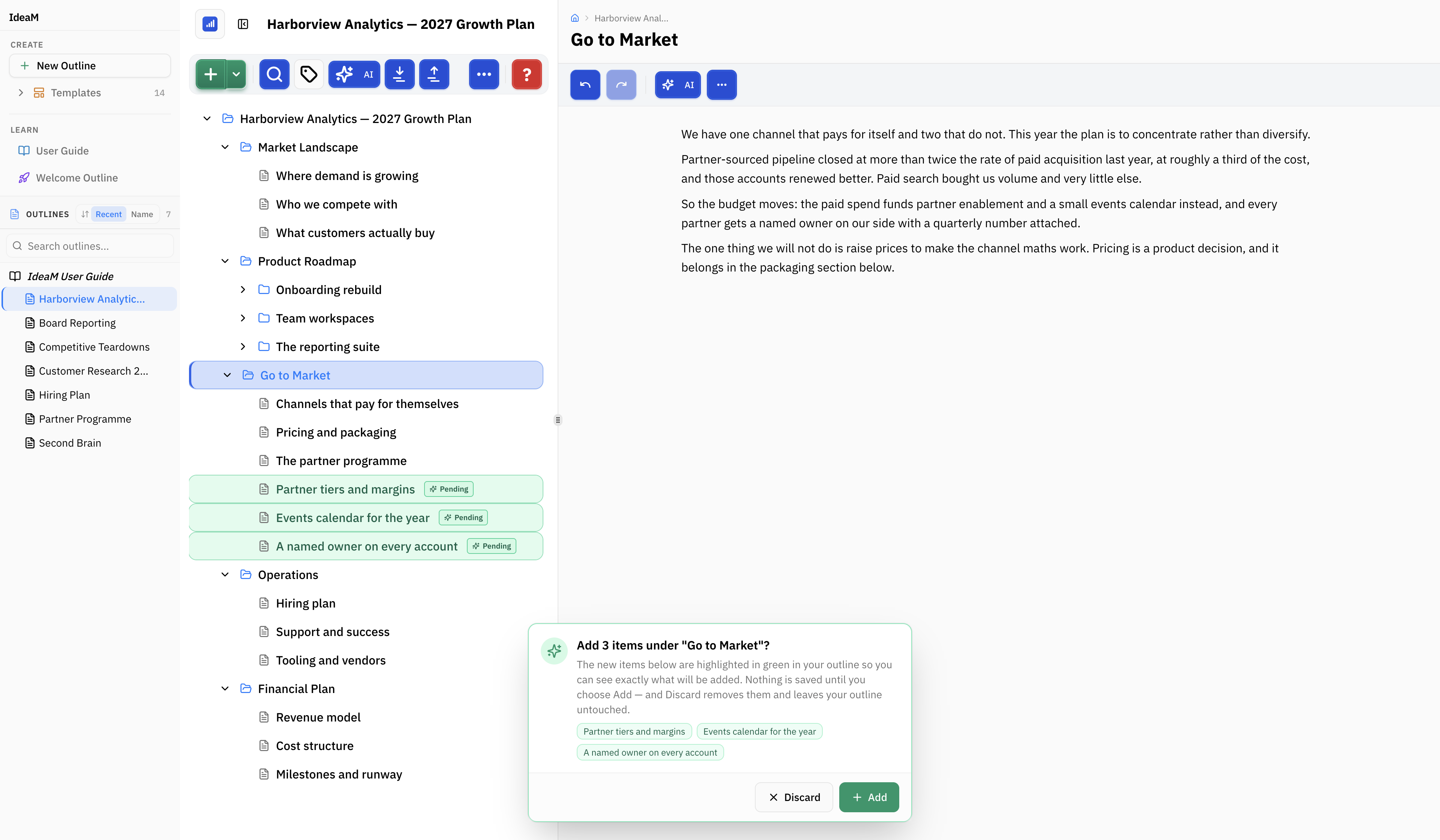
Nothing changes until you say so
AI proposes; you decide. Rewrites, insertions and deletions arrive as a proposal you can read line by line and accept or reject one at a time, with every affected line marked in the outline behind it. Want it to move faster? Turn Final Say off and changes land directly. A snapshot is saved either way, so going back is always available.
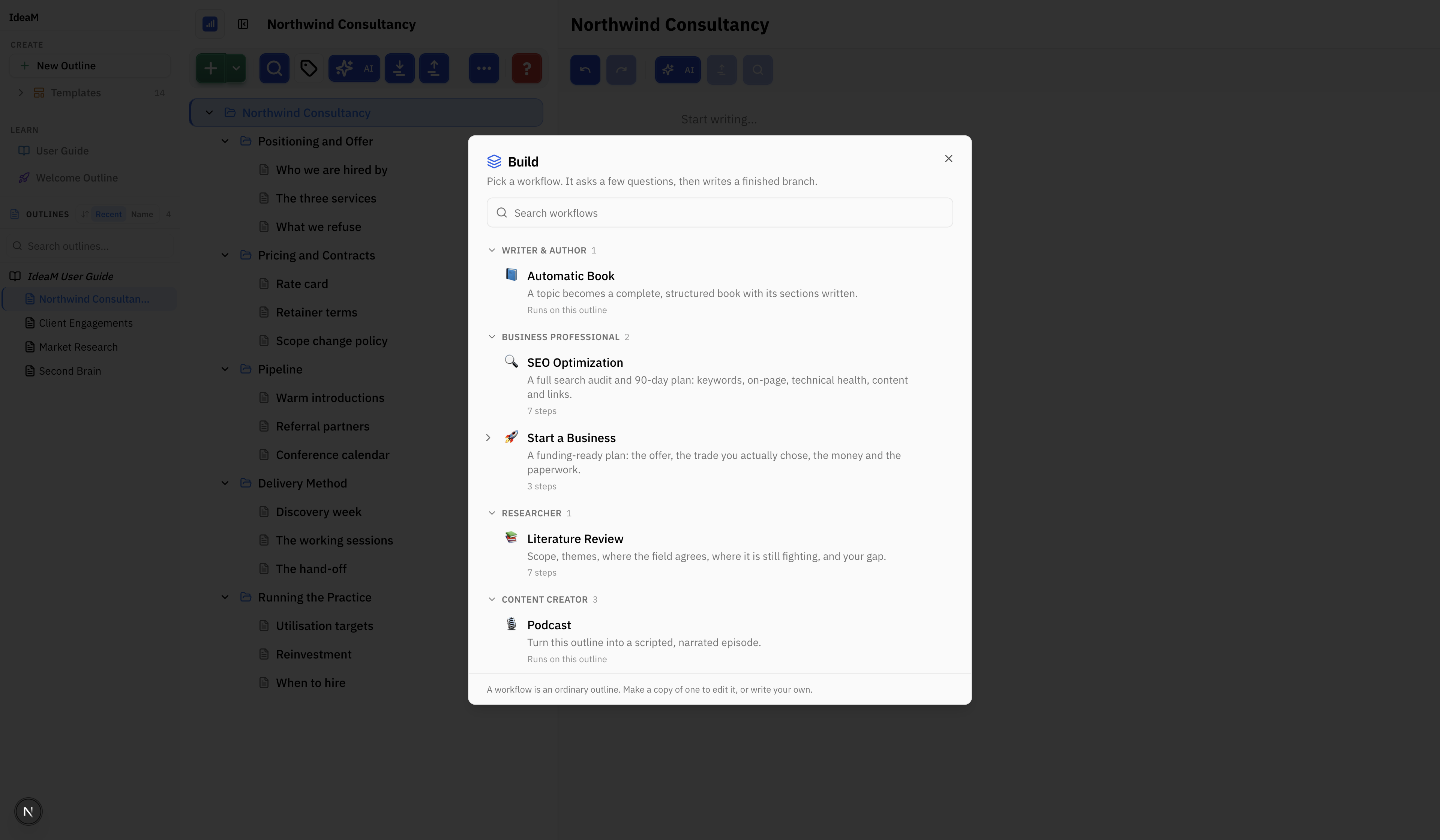
A workflow writes the branch for you
Pick a workflow, answer a few questions, and a finished branch appears — a business plan, an SEO audit, a literature review, or a whole book, podcast, video or website.
Built for professional researchers at leading institutions
Why Professionals Choose IdeaM
Built for research-grade work
Consumer note-taking apps weren't designed for professional research. IdeaM was built from the ground up for serious knowledge synthesis.
✗What other tools do
- •Take notes and organize them manually
- •Import one file at a time, if at all
- •AI as an afterthought—generic chat bolted on
- •Force you to choose: mobile OR desktop experience
- •Lock your data in proprietary formats
✓What IdeaM does differently
- Multi-source synthesis—import 50+ sources and let AI organize by theme
- 10+ source types—YouTube, PDFs, audio with transcription, web pages, docs
- AI-native from day one—content generation, synthesis, diagrams, podcasts
- True cross-platform—identical experience on Mac, iPhone, iPad, and web
- AI you can inspect—every AI edit is shown before it happens; approve, adjust, or discard
- Your data, your way—32 export formats, local-first storage, no lock-in
| Feature | IdeaM | Notion | Obsidian | Roam |
|---|---|---|---|---|
| Multi-source AI synthesis (50+ sources) | ||||
| Speaker diarization (who said what) | ||||
| PDF & document import with analysis | Limited | |||
| YouTube transcript import | Plugin | |||
| AI content generation | Plugin | |||
| Podcast generation | ||||
| Local-first storage | ||||
| Native iOS app | Basic | Basic | ||
| 1,000,000+ node capacity* | Slows | Slows |
0+
nodes in a single outline*
Stress-tested with over one million nodes. No artificial limits—scale until your hardware says stop. Your biggest research projects, handled with ease.
*Tested on M4 MacBook Air with 512GB SSD. Performance varies by hardware and platform.
AI-First
Every feature designed around AI from day one
Privacy-First
Local storage by default. Cloud is optional.
Blazing Fast
Instant response, even with massive outlines
19 Node Types
Tasks, code, media, spreadsheets, and more
Privacy is not
an afterthought
Unlike cloud-first apps that hold your data hostage, IdeaM is built local-first. Your outlines live on your device. You're always in control.
Local-First Storage
Your data is stored on your device by default. No cloud required. No servers holding your thoughts.
Never Sold, Never Shared
We will never sell your data. Period. Your content is yours alone.
No AI Training on Your Data
When you use AI features your content is read to answer you, and it is excluded from AI model training under our providers’ terms.
Export Anytime, Any Format
32 export formats mean you're never locked in. Leave anytime with all your data.
Your Data Promise
- Data stored locally on your device
- Optional encrypted cloud backup
- No data sold to third parties
- Content never used for AI training
- GDPR & CCPA compliant
- Full data export anytime
Works everywhere you do
One subscription, all platforms. Your second brain syncs seamlessly across every device.
Apple prototypes available now. Windows, Linux, and Android coming at launch.
Desktop
Mobile & Tablet
Web
Ready to think bigger?
Start turning your ideas into structured, living outlines today. It's free to begin — no credit card required.
Sign up free